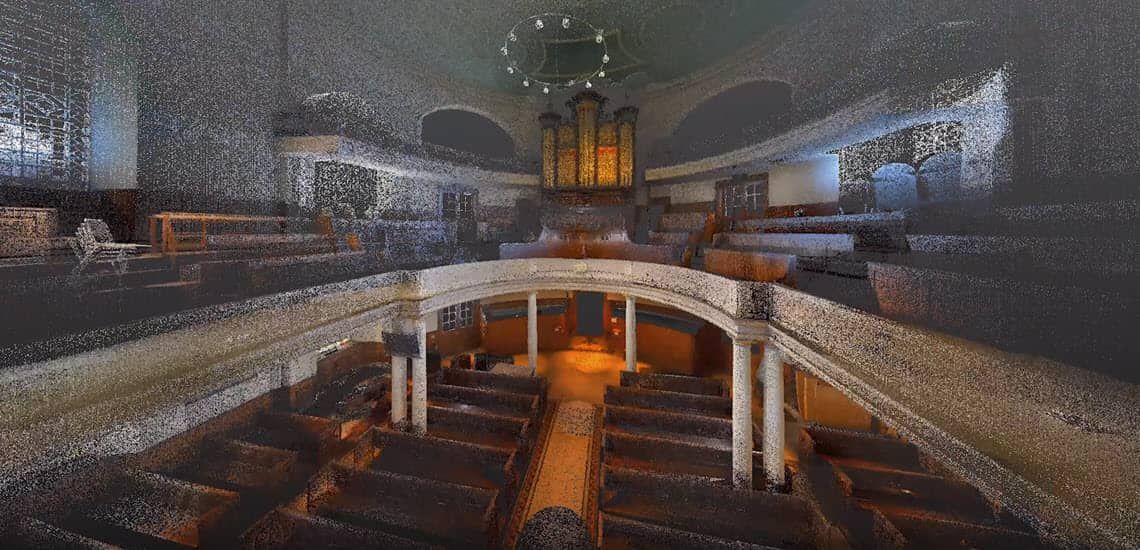
If you are working in the construction industry, you have probably come across the term "Scan to BIM’" or "Field to BIM" at some point. Or, you may have noticed your construction partners using a 3D laser scanner on the building site. But what is Scan to BIM exactly — and how does it work?
Let’s start with the part you are probably already familiar with: BIM. Building Information Modeling is a highly collaborative process that allows multiple stakeholders to collaborate on the planning, design and construction of a building within one 3D model.
To create accurate models successfully, having precise measurements to work from is key. With 3D laser scans, the accuracy of measurements and 3D model content in BIM-projects reaches new levels. Scan to BIM enables a data-rich, connected and constructible workflow.
So, what is Scan to BIM?
In a Scan to BIM process, a laser scanner is used to capture an accurate 3D scan of the real world conditions on a project. The scan data is then imported into a 3D modeling environment to create either accurate as-built models or to inform the design with the real world conditions. As defined by The B1M, Scan to BIM is:
The process of 3D laser scanning a physical space or site to create an accurate digital representation of it. This representation can then be used for designing, assessing progress or evaluating option.
Three important steps of the scanning process are:
Collecting data with a 3D laser scanner;
Bringing this data back to the design office;
Using it in the BIM process.
Why do contractors use 3D laser scanning?
3D laser scanning allows contractors to collect the as-is conditions on a project site quickly to provide both accurate and up-to-date data that is valuable throughout the different design and construction stages. It is then used to verify as-built models, monitor progress on a project, create as-built models for existing structures or to augment missing design data. Many projects now require a contractor to deliver a point cloud as a final project deliverable to document the location of new construction for the building owner.
Scan to BIM allows you to create a highly accurate three-dimensional digital representation of your building - in a reduced amount of time.
Some of the advantages of Scan to BIM:
It removes a large degree of human error from traditional as-built documentation processes
The data is collected over a considerably shorter period of time
Information can be shared faster
Teams only need to visit the site once to collect data
How does Scan to BIM work?
Scanning: capturing data
Thanks to modern 3D scanning technology, contractors are able to collect field data with high speed and accuracy. The 3D laser scanner is placed on a tripod and contains an eye-safe laser rotating at high speed. As the laser beam hits a solid surface, the position relative to the scanner is recorded as a X,Y,Z coordinate (also known as a “point”). Millions of these points together make up a highly accurate digital picture, commonly referred to as a point cloud. After the scanner collects points, it will capture color images that are used to colorize the scan to create a realistic 3D representation.
So which steps do you need to take to get your scanned data to a BIM model? Check out this video where a 3D laser scan is performed at a heritage building or read the steps below.
In 7 steps from Scan to BIM
Before sending someone out to collect data for your Scan to BIM project, make sure you have the goal in mind. What will the data be used for? If the team knows what you will use it for, you can be more efficient in the capture of scan data on a project.
Send someone to the project site to conduct the scanning.
The person conducting the scan needs to set up the scanner and enter some parameters such as the scan density or the number of measurement points to take with each scan.
The scanner can only capture what it can see (line of sight). In order to get a complete representation of the project, you need to take multiple scans from different locations. When you know the purpose of your scan data, you can be the most efficient with your time.
Transfer the data from the scanner to a computer with a USB drive or a cloud file-sharing platform like Trimble Connect
Before sharing the scan data with others, the individual scans need to be registered into one composite point cloud. Use point cloud modeling software to register, analyze and model your data.
After registering your point cloud, the data can be imported into your modeling software and you can start creating constructible model content, using the point cloud data and your construction knowledge.
By using the accuracy and speed of 3D laser scanning in a BIM process, information flows (almost) seamlessly from field to office, allowing contractors to create constructible models in no time. There is no doubt that Scan to BIM is transforming the way contractors work today, putting both data and connected content into the heart of the construction process.

