Overview
Features and highlights
Frictionless Portfolio Scaling: Stop worrying about software bottlenecks or disconnected folders. ProjectSight Go is designed to support your expanding pipeline, offering the streamlined environment required to efficiently manage your active project lifecycle as you scale your business.
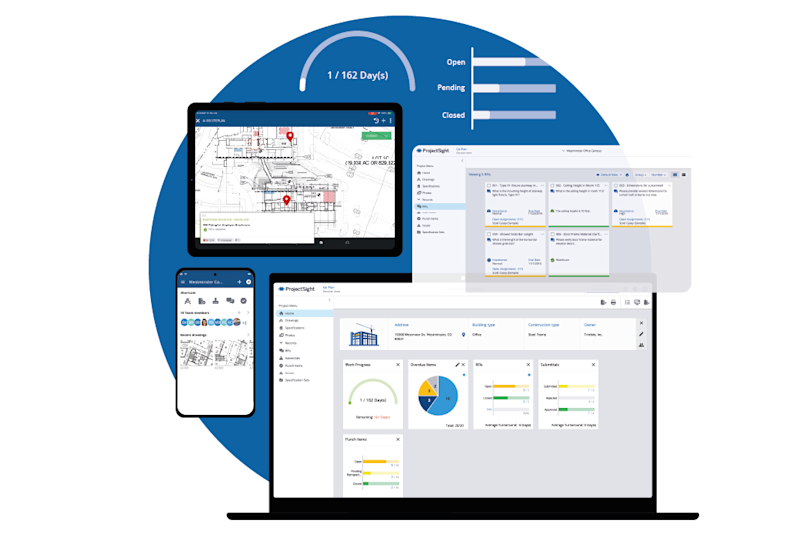
AI-Powered Drawing Management: Get the latest, accurate plans to the field. Use AI to speed up drawing uploads and easily link RFIs, punch lists, and photos directly to the sheets for total context.
Ironclad Document Control: Keep every stakeholder accountable and prevent schedule delays by centrally managing RFIs, submittals, and specifications.
Field Management & Daily Reports: Give your superintendents and foremen the tools they need to capture jobsite realities via photos, track issues, and submit accurate Daily Reports right from the deck.
Custom Roles & Security: Enforce operational compliance across your entire portfolio with customized security roles that ensure the right people have exactly the right access.
Technical specifications
Platform Access: Fully accessible via any modern web browser for your office and operations teams.
Mobile Application: Purpose-built mobile app available for both iOS and Android devices to keep field personnel connected to the most current project data.
Offline Capability: Features robust offline functionality, ensuring your field teams can access vital project data and log information even when the jobsite is in a dead zone without Wi-Fi or cellular connectivity.
What's included
Scalable Project Access: Run and manage your full active workload simultaneously. ProjectSight Go removes the hurdles, so you can transition between jobs seamlessly as your portfolio grows.
15 GB Data Storage: Ample cloud storage dedicated strictly to housing your heavy project documents, drawings, and jobsite photos.
Expert Human Support: When time is money on a live job, skip the automated queues. You get direct access to a North America-based support hotline via phone or email (5 am to 5 pm PT, M-F) to resolve critical issues quickly.
Project Export: Safely archive all documentation upon project completion, giving you a date-stamped, auditable record of what happened and when for long-term compliance.
Implementation & Training Resources: Designed to be easy to learn, your plan includes in-app feature guides, prompts, a robust help menu, and full access to learning videos on The Network.
How it works
1. Purchase & Provision: Skip the lengthy sales demonstrations and contract negotiations. Simply select the number of licenses you need online, check out, and unlock your workspace.
2. Onboard quickly: Leverage intuitive in-app prompts and guided walkthroughs so your team can self-onboard without an expensive implementation package, getting you to work in minutes.
3. Connect the Field: Have your crews download the mobile app, invite your users, and sync your latest drawings and documents so everyone—from the office to the jobsite—is building from a single source of truth.
Overview
Features and highlights
Frictionless Portfolio Scaling: Stop worrying about software bottlenecks or disconnected folders. ProjectSight Go is designed to support your expanding pipeline, offering the streamlined environment required to efficiently manage your active project lifecycle as you scale your business.
AI-Powered Drawing Management: Get the latest, accurate plans to the field. Use AI to speed up drawing uploads and easily link RFIs, punch lists, and photos directly to the sheets for total context.
Ironclad Document Control: Keep every stakeholder accountable and prevent schedule delays by centrally managing RFIs, submittals, and specifications.
Field Management & Daily Reports: Give your superintendents and foremen the tools they need to capture jobsite realities via photos, track issues, and submit accurate Daily Reports right from the deck.
Custom Roles & Security: Enforce operational compliance across your entire portfolio with customized security roles that ensure the right people have exactly the right access.
Technical specifications
Platform Access: Fully accessible via any modern web browser for your office and operations teams.
Mobile Application: Purpose-built mobile app available for both iOS and Android devices to keep field personnel connected to the most current project data.
Offline Capability: Features robust offline functionality, ensuring your field teams can access vital project data and log information even when the jobsite is in a dead zone without Wi-Fi or cellular connectivity.
What's included
Scalable Project Access: Run and manage your full active workload simultaneously. ProjectSight Go removes the hurdles, so you can transition between jobs seamlessly as your portfolio grows.
15 GB Data Storage: Ample cloud storage dedicated strictly to housing your heavy project documents, drawings, and jobsite photos.
Expert Human Support: When time is money on a live job, skip the automated queues. You get direct access to a North America-based support hotline via phone or email (5 am to 5 pm PT, M-F) to resolve critical issues quickly.
Project Export: Safely archive all documentation upon project completion, giving you a date-stamped, auditable record of what happened and when for long-term compliance.
Implementation & Training Resources: Designed to be easy to learn, your plan includes in-app feature guides, prompts, a robust help menu, and full access to learning videos on The Network.
How it works
1. Purchase & Provision: Skip the lengthy sales demonstrations and contract negotiations. Simply select the number of licenses you need online, check out, and unlock your workspace.
2. Onboard quickly: Leverage intuitive in-app prompts and guided walkthroughs so your team can self-onboard without an expensive implementation package, getting you to work in minutes.
3. Connect the Field: Have your crews download the mobile app, invite your users, and sync your latest drawings and documents so everyone—from the office to the jobsite—is building from a single source of truth.
Please get in touch with your account owner for assistance. If you wish to make a purchase, we recommend signing out and creating a personal account.