Overview
Features and highlights
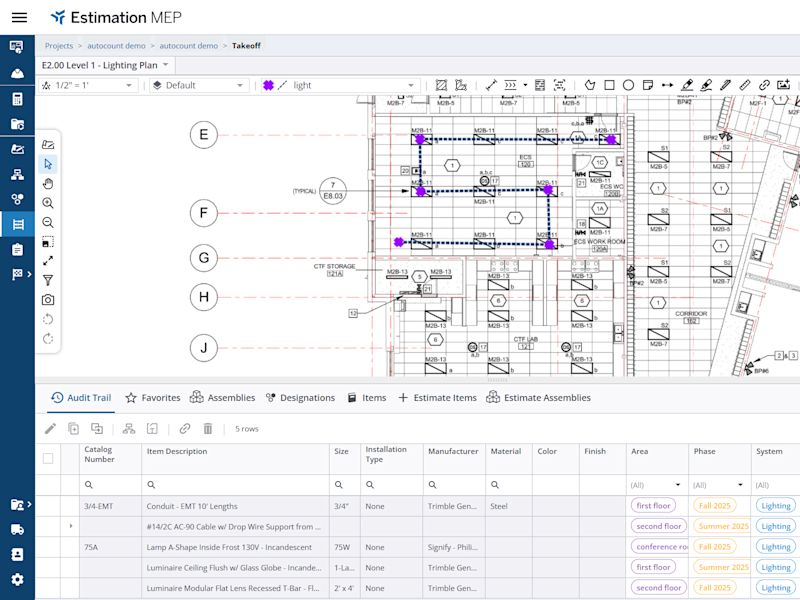
AI-Powered Takeoff: Cut manual counting out of your workflow. Our AI automatically detects scales, symbols, and length measurements, turning hours of tedious takeoff into minutes of simple verification.
Live Pricing & Content: Bid with certainty using built-in access to hundreds of thousands of managed MEP items, complete with real-time material pricing and labor data.
Built for the Cloud: Access your estimates from a web browser on Mac or PC. Work from the office, the jobsite, or home with a secure, zero-maintenance solution.
All-in-One Simplicity: Stop toggling between Excel and drawing viewers. Manage your documents, takeoff, and pricing in one integrated workspace designed for speed.
Technical specifications
A laptop or desktop—Mac or PC
Web browser
Google Chrome required
Display
1024x768 resolution or higher
4K monitors supported
Second monitor for a more efficient experience (Recommended)
Connectivity
Requires a reliable broadband internet connection (10 Mbps or faster)
Certifications
ISO 27001:2013
NIST 800-171
What's included
Software Access: Full access to the latest version of the application.
Support: 24/5 technical support via My Trimble and email.
Updates: Automatic feature enhancements and security patches included at no extra cost.
Resources: Unlimited access to the online Knowledge Base and onboarding video tutorials.
Storage: Unlimited storage for all your drawings and documents.
How it works
Purchase: Select your preferred plan and complete checkout.
Activation: Once your order is confirmed, log in to the Trimble Admin Console using your Trimble ID.
Assign Licenses: Use the Admin Console to assign licenses to yourself or your team members.
Launch Estimation MEP: Click on Estimation MEP in the Admin Console to open the application URL.
Collaborate: Start creating projects and inviting collaborators immediately.
Overview
Features and highlights
AI-Powered Takeoff: Cut manual counting out of your workflow. Our AI automatically detects scales, symbols, and length measurements, turning hours of tedious takeoff into minutes of simple verification.
Live Pricing & Content: Bid with certainty using built-in access to hundreds of thousands of managed MEP items, complete with real-time material pricing and labor data.
Built for the Cloud: Access your estimates from a web browser on Mac or PC. Work from the office, the jobsite, or home with a secure, zero-maintenance solution.
All-in-One Simplicity: Stop toggling between Excel and drawing viewers. Manage your documents, takeoff, and pricing in one integrated workspace designed for speed.
Technical specifications
A laptop or desktop—Mac or PC
Web browser
Google Chrome required
Display
1024x768 resolution or higher
4K monitors supported
Second monitor for a more efficient experience (Recommended)
Connectivity
Requires a reliable broadband internet connection (10 Mbps or faster)
Certifications
ISO 27001:2013
NIST 800-171
What's included
Software Access: Full access to the latest version of the application.
Support: 24/5 technical support via My Trimble and email.
Updates: Automatic feature enhancements and security patches included at no extra cost.
Resources: Unlimited access to the online Knowledge Base and onboarding video tutorials.
Storage: Unlimited storage for all your drawings and documents.
How it works
Purchase: Select your preferred plan and complete checkout.
Activation: Once your order is confirmed, log in to the Trimble Admin Console using your Trimble ID.
Assign Licenses: Use the Admin Console to assign licenses to yourself or your team members.
Launch Estimation MEP: Click on Estimation MEP in the Admin Console to open the application URL.
Collaborate: Start creating projects and inviting collaborators immediately.
Please get in touch with your account owner for assistance. If you wish to make a purchase, we recommend signing out and creating a personal account.