Présentation
Caractéristiques et points forts
Pro-level proposals: Build your own proposal or import electrical or mechanical estimates with cost types and project phase breakdowns.
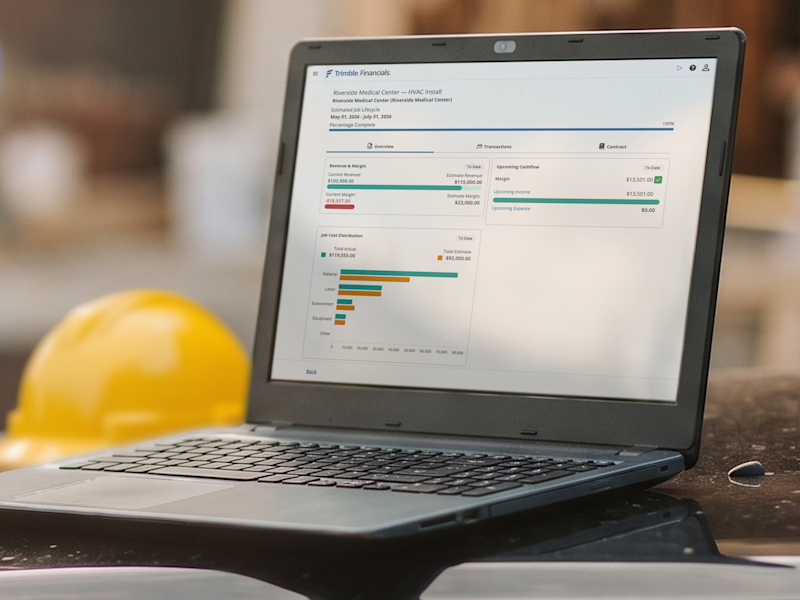
Total job cost visibility: Tag expenses to jobs, phases and cost types, and see committed vs. actual costs, so you always know where you stand.
Simple billing: Easily generate invoices and get paid faster. Automatically calculate your taxes based on the project zip code and services provided.
Painless reporting: Instantly create financial reports for your bookkeeper, CPA or bank and get a real-time view of your company’s financial position.
Built for AI: Trimble Financials Go was built to use Trimble's AI Platform.
Spécifications techniques
Trimble Financials Go is a mobile optimized website compatible with:
Browsers:
Google Chrome
Microsoft Edge
Apple Safari
Operating Systems:
Windows 10 and later
macOS Monterey and later
Devices:
iOS (iPhone, iPad) using Safari and Chrome
Android devices using Chrome
Abonnements et tarifs
Annual subscription with auto-renewal: $1,188 USD/year
Contenu
Unlimited jobs, vendors, customers, expenses and invoices.
Mobile, tablet and desktop browser versions.
24/5 technical support via email and the Trimble Support Portal.
Help documentation in the Trimble portal and AI help agent.
Fonctionnement
Purchase: Select your plan and complete the checkout process.
Activate: Once your order is confirmed, log in to the Trimble Admin Console using your Trimble ID (TID).
Assign licenses: Use the console to assign licenses to yourself and/or your team members.
Launch: Follow the setup link in your confirmation email to access Trimble Financials.
Complete your profile: Log into Trimble Financials to add your company details, including company name and type, EIN/SSN, address, phone and contact email.
Configure Avalara for taxes: You'll only need your address again— all future tax setup will be based on job location.
Run your jobs: Start creating proposals, projects, customers and vendors.
Présentation
Caractéristiques et points forts
Pro-level proposals: Build your own proposal or import electrical or mechanical estimates with cost types and project phase breakdowns.
Total job cost visibility: Tag expenses to jobs, phases and cost types, and see committed vs. actual costs, so you always know where you stand.
Simple billing: Easily generate invoices and get paid faster. Automatically calculate your taxes based on the project zip code and services provided.
Painless reporting: Instantly create financial reports for your bookkeeper, CPA or bank and get a real-time view of your company’s financial position.
Built for AI: Trimble Financials Go was built to use Trimble's AI Platform.
Spécifications techniques
Trimble Financials Go is a mobile optimized website compatible with:
Browsers:
Google Chrome
Microsoft Edge
Apple Safari
Operating Systems:
Windows 10 and later
macOS Monterey and later
Devices:
iOS (iPhone, iPad) using Safari and Chrome
Android devices using Chrome
Abonnements et tarifs
Annual subscription with auto-renewal: $1,188 USD/year
Contenu
Unlimited jobs, vendors, customers, expenses and invoices.
Mobile, tablet and desktop browser versions.
24/5 technical support via email and the Trimble Support Portal.
Help documentation in the Trimble portal and AI help agent.
Fonctionnement
Purchase: Select your plan and complete the checkout process.
Activate: Once your order is confirmed, log in to the Trimble Admin Console using your Trimble ID (TID).
Assign licenses: Use the console to assign licenses to yourself and/or your team members.
Launch: Follow the setup link in your confirmation email to access Trimble Financials.
Complete your profile: Log into Trimble Financials to add your company details, including company name and type, EIN/SSN, address, phone and contact email.
Configure Avalara for taxes: You'll only need your address again— all future tax setup will be based on job location.
Run your jobs: Start creating proposals, projects, customers and vendors.
Contactez le détenteur de votre compte pour obtenir de l'aide. Si vous souhaitez effectuer un achat, nous vous recommandons de vous déconnecter et de créer un compte personnel.