
Skip to content

Three ways to ensure your model is free of errors

2 minutes read
|
November 13, 2023

Share this post:

Engineer looking at an error-free model on a screen

Undeniably, error analysis is integral because it targets uncertainties or errors in measurements and calculations. For structural engineers, the accuracy and reliability of their analysis results is crucial, so they can be sure that the data they’re passing along is correct. Being able to identify and quantify the inaccuracies or deviations in a model early-on is essential to avoid them becoming a bigger problem and creating ongoing issues in a project—not to mention other project stakeholders losing confidence in the analyses provided by the structural engineer.

Typically, structural validations are carried out after completion of the structural calculations, in order to ensure that what the engineers have calculated in theory is feasible in practice and doesn’t incorporate stresses that weren’t analyzed when making the calculations. While encountering errors is inevitable, understanding their implications is essential. Not catching them early enough can lead to an inaccurate model, wrong predictions and faulty designs. 

In order to properly identify and eliminate errors early in the process, here are three types of validation structural engineers can use to ensure their measurements and calculations are correct:
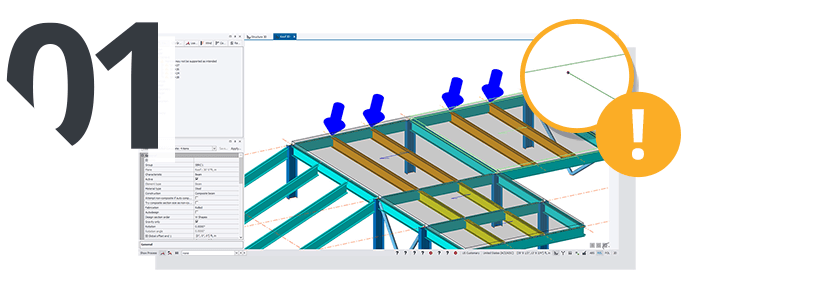
3D model showing a structure with load simulation and warning icon.

Model Validation

This type of validation should be one of the first integrity checks performed on a model and can be performed as many times as needed. Performing model integrity checks ensures that all the assemblies in a model are connected and supported correctly, and that loads are applied correctly.

For example, a model integrity check will let you know if there’s a panel that’s not surrounded by load carrying members, if there are members at risk for collison or if a grid is not quite aligned with building directions. These types of checks are essential to making sure the model is correctly constructed.
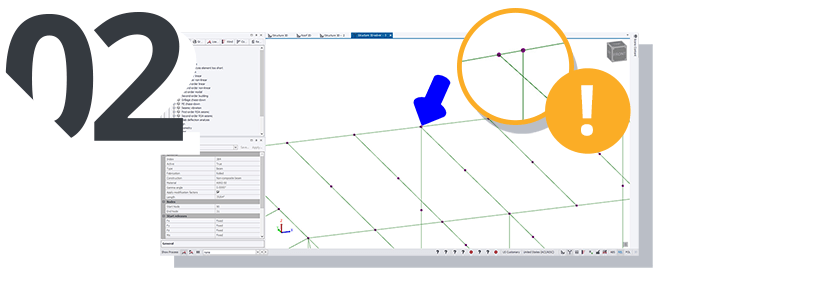
Screenshot of a 3D model with a blue arrow pointing to a node in a structural analysis.

Analysis Validation

An analysis validation guarantees that the final physical model will translate directly to the “solver model”, which is the 3D mathematical model that can be further used for analyzing structural behavior and design.

One of the errors that this type of analysis can catch is any analysis members that are too short. If an analysis element is too short, it will be unrealistically stiff, and thus attract an excessive amount of load, leading to unrealistic results. By setting a specific threshold, structural engineers can be warned when this threshold is surpassed and renders unrealistic results.
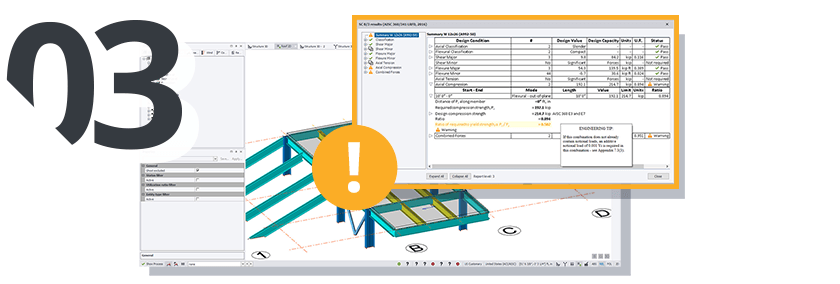
3D rendering of a structural design with a warning symbol and data table.

Design Validation

Design validations can be performed to ensure that the design in the model is valid and can actually be constructed. This validation will catch any design issues and alert the structural engineers to any errors that will cause the design to fail.

A main benefit of efficient and effective structural analysis and design software is often these validations will be performed automatically on the model, alerting the engineer to any model, analysis or design issues without them having to perform any manual checks. 

The role structural engineers play in the design and modeling process is critical—a structure with inaccurate measurements or predictions will ultimately cost far more in correcting errors and making necessary changes than the time it takes to do an error analysis. Understanding error analysis helps structural engineers identify, address and rectify these errors virtually, before they become much more expensive and time-consuming to resolve in the real world. While errors are inevitable, being able to identify and remedy them early on in the process significantly improves the quality and reliability of analysis results.

Want more ways to improve your workflows? Learn about improving productivity and efficiency here.

Related articles

Article

3 ways to enhance infrastructure management with Nearmap and Trimble Cityworks

Using Nearmap in conjunction with Trimble Cityworks and Esri ArcGIS offers a highly scalable and eff...
Read full article
Article

3 improvements to the bridge inspection process

A critical part of the inspection process is taking photos of various parts of the bridge and their ...
Read full article
Article

5 tips for leveraging query eURLs

eURLs allow organizations to easily share real-time information on everything from work activities a...
Read full article
Attention

We tried to combine the products in your guest cart with your saved cart, but we encountered an issue while merging them. When choosing a subscription, please select either monthly or yearly as they cannot be combined. Kindly review your cart before proceeding to checkout.

Cart updated
Some items in your cart are not available for purchase in your region, so we removed them. Please review your cart before proceeding.

Items Removed:
Attention

The software you are trying to purchase is not available in your country or region.

Cart updated
The items in your cart have been updated for two reasons. Firstly, the prices now match the currency linked to your account address. Secondly, some items have been removed because they are not available for purchase in your region. Please review your cart before proceeding.

Items Removed:
Cart updated
The items in your cart have been updated for two reasons. Firstly, you've added too many of one item to your cart. Secondly, some items have been removed because they are not available for purchase in your region. Please review your cart before proceeding.

Items Removed:
Cart updated
The items in your cart have been updated for three reasons. Firstly, the prices now match the currency linked to your account address. Secondly, you've added too many of one item to your cart. Thirdly, some items have been removed because they are not available for purchase in your region. Please review your cart before proceeding

Items Removed:
Cart updated

Your currency has been changed to match the currency associated with your account address.

Cart updated

Your cart has been updated for two reasons. First, the prices now reflect the currency associated with your account address. Second, you've added too many of one item to your cart. Please review your cart before proceeding.

Cart updated

While combining the products in your guest cart with your saved cart, at least one item in your cart has exceeded the maximum allowable quantity. Please review and correct your cart before proceeding to checkout.

Attention

We were unable to access your account information. Please contact customer support for assistance.

Attention
Unable to update shopping cart information. Please refresh the page to resolve the issue. If this issue persists, please contact Trimble support.
© 2026 Trimble Inc.

Trimble is a global technology company that connects the physical and digital worlds, transforming the ways work gets done. With relentless innovation in precise positioning, modeling and data analytics, Trimble enables essential industries including construction, geospatial and transportation. Whether it's helping customers build and maintain infrastructure, design and construct buildings, optimize global supply chains or map the world, Trimble is at the forefront, driving productivity and progress.