BIM tools such as Revit have had a massive impact on how mechanical and electrical design happens, but they haven’t really been around for that long.
The idea of BIM has been around since the 1970s, but it wasn’t until it became widely used within the construction industry that the software required to create the models envisioned decades earlier became available to the public.
Revit, on the other hand, was first created in 1997, but it wasn’t until it was bought by Autodesk in 2002 that it started to become what we know today.
In an industry where we still rely on Newtonian physics from centuries ago, that’s really the blink of an eye. So, it’s not surprising that many engineers, designers, and M&E firms are still trying to determine how to get the most out of these invaluable tools.
It’s all so new that even ISO 19650, the standard for digitisation of building information, was only released in 2018. We’re all charting new territory in many ways, but the tools themselves can often help establish the best possible systems, processes, and workflows. Here’s how M&E design software can drive design process standardisation in your company.
Jump to:
Creating Standard Calculation Rules
Keep Your Data Clean and Current
Managing Access and Permissions
Simpler, More Accurate, and More Secure
Creating Standard Calculation Rules
Calculations have always been, and still are, one of the elements of M&E design that are most open to interpretation and prone to human error. When you combine those two things, it makes sense to create standard calculation rules and parameters that comply with local regulations to increase accuracy and improve results.
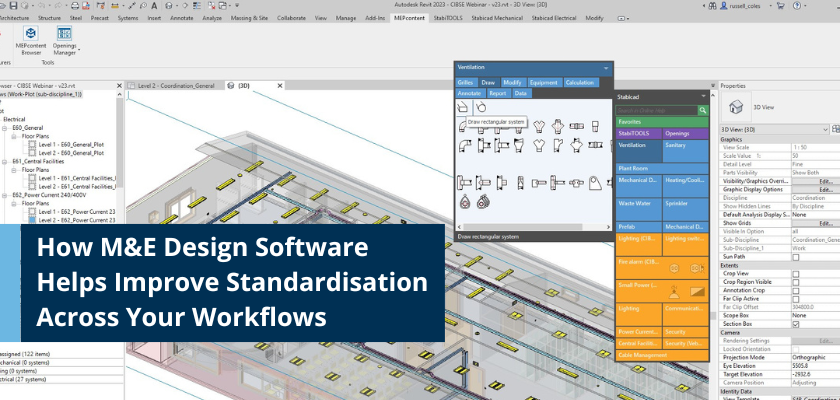
Specialist M&E design software, like Stabicad for Revit, has built-in calculations that allows design and engineering leaders to standardise many of the most common M&E calculations within the design workspace itself, meaning there’s less chance that someone will take a different approach. Since Stabicad's M&E calculations are CIBSE verified, you can be confident knowing everyone is working with accurate and compliant calculation methods.
In short, Stabicad’s verified calculations ensure engineers are confident, removes the need for double-checking and reduces inaccuracies.
Limit Data Transfer Errors
Sometimes, the calculations aren’t the problem. It’s the process of transferring them manually from other software and spreadsheets that causes trouble. Just one comma out of place or one digit mistyped could lead to damaging results and when your team is transferring large amounts of data and figures, that’s always a possibility.
M&E design software like Stabicad for Revit allows your team to complete their calculations inside their design software environment. So there’s no transfer required and no errors to worry about.
Keep Your Data Clean and Current
Another massive hurdle for M&E companies trying to harness the design capabilities of BIM tools like Revit is maintaining the vast volumes of content and data required to create accurate, compliant models.
Again, the biggest problem is that many are trying to do all of this manually. The sheer volume of information means that most build-your-own databases tend to have old, outdated or incorrect information scattered throughout.
Specialist M&E design software systems like Stabicad include the capabilities of standardising the content across the business, from creating, managing, and releasing accurate content for the design teams, so M&E engineers will always work with the most up-to-date information.
Setting Rules
Another challenge for M&E engineers when digitising their processes and standardising workflows is that the scope of design possibilities is so vast. In fact, if you walk into any M&E design office in the country, you’ll find that everyone approaches MEP systems a little differently.
With so many design options, it’s not surprising that just getting everyone on the same page is often the first hurdle of the design phase of any project.
M&E design software like Stabicad for Revit eliminates some of these problems by giving system administrators the option to set modelling rules, for example, the connection of terminals and applying tags. While that still leaves room for a lot of creativity and innovation in the design of the system, it creates a set of guardrails that help to keep the design phase within reasonable parameters.
Building to Match
One of the biggest problems with a lot of digital systems out there is that they’re not as flexible, customisable or discipline-specific as you’d like.
Often, teams turn to less efficient options like spreadsheets because they can build them to their exact specifications. But when everyone has their own set of spreadsheets, it’s very hard to standardise anything.
Digital tools like Stabicad offer M&E engineers and their teams the option of building their database to match their workflow processes. The processes are highly customisable so you have much more control over how your design phase progresses at every stage.
Managing Access and Permissions
If you’ve ever accidentally deleted a spreadsheet or clicked no when asked if you want to save a document, you know just how quickly things can go wrong.
Even when you trust your team implicitly, data security matters because accidents can and do happen all the time. Not to mention, they can create huge delays, require enormous amounts of work to repair, or might not be caught until much later in the project.
That’s another key area that good M&E design software solves for engineers and their teams. Stabicad’s user permissions are designed to manage and control access rights within the solution, ensuring that users can only access features and functions relevant to their role or project requirements. This helps maintain data integrity and security within the Stabicad environment.
Simpler, More Accurate, and More Secure
When you get right down to it, many of the reasons why we don’t standardise processes or workflows come down to convenience.
When we know we need to switch between spreadsheets, drawing boards, calculators and other software, it’s a lot harder to create a solution that will work for the design phase of any MEP system design project.
Modern software and digital tools, when combined correctly, have changed all that. When you’re using the right digital tools with the right features and functionality, it’s a lot easier to create a system that is simpler, more accurate and more secure. At the same time, you’ll decrease the amount of manual, hands-on work your team needs to do so they can focus on building better designs for your clients.
Watch how AV Unibrak has standardised their design workflows.

