Skip to content

Algorithm enabled parametric BIM: 5 steps to getting started

2 minutes read
|
October 31, 2022

Share this post:

A digital rendering of a modern cable-stayed bridge with a colorful, multi-layered pedestrian walkway.

In the first article of this two-part series, we explained algorithm enabled parametric BIM (some simply call it parametric design or algorithmic modeling) and shared some of the ways structural engineers are using this workflow to quickly explore complex design alternatives. If you’re interested in learning more, these five steps will help pave the way to more productive and efficient workflows, and rapid iterations in the design of complex structures and curved shapes when linking algorithmic scripting with a real parametric BIM tool, such as Tekla Structures.   

1. Be willing to try something new

This may seem obvious, but it would be easy to see the words parametric or algorithmic and think, “this is too complicated” or “I’m not a programmer and I don’t have time to learn something new.” However, the full version of Rhino Grasshopper is free to evaluate for 90 days. What’s the harm in trying it out? If you’re a Tekla Structures user, the direct link to Grasshopper is available to you today in the Tekla Warehouse

2. Take advantage of tutorials and instructional videos

The best way to learn is online through videos made by other structural engineers, tutorials and forums. Some of our favorites: Grasshopper-Tekla Structures demo, Grasshopper basics and these tutorials

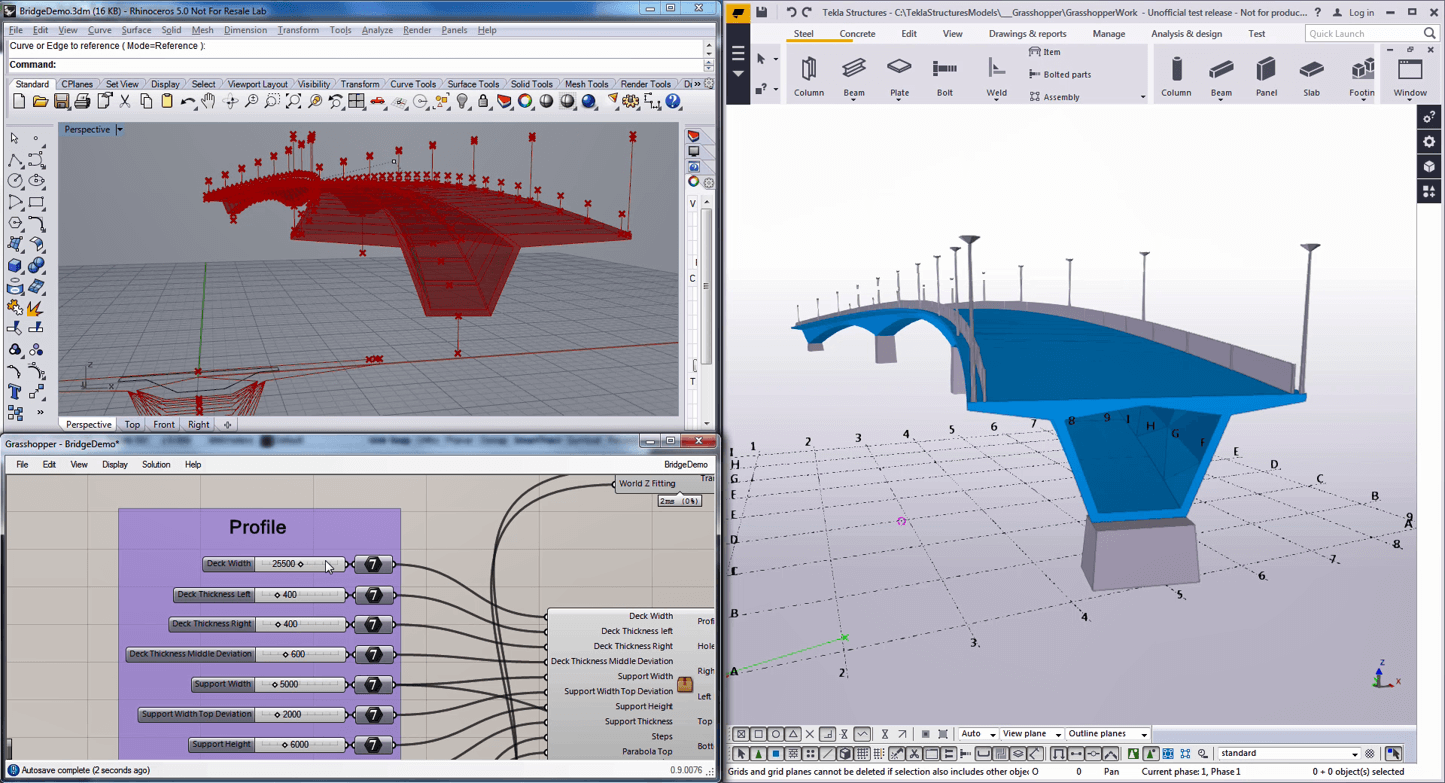
Parametric modeling software shows a bridge design, with code and 3D models on screen.

3. Experiment with a simple design 

Start by experimenting and with parametric data for a simple design in Grasshopper and creating output objects in a parametric BIM software such as Tekla Structures. You don’t have to jump right in and learn using a complex bridge model. For example, start with building a simple wireframe structure, such as a portal frame, and use the line output as centerlines for your parametric BIM objects.

4. Explore sample Grasshopper scripts

With the installation of the Tekla Structures link to Grasshopper, you’ll have access to some sample scripts (those containing the input parameters and rules) in Tekla Warehouse. You can use these as a guide for the types of scripts you might create when trying out Grasshopper. 

5. Get organized

Once you get started, it’s important to know that algorithmic enabled parametric modeling or parametric design requires organization. You’ll need to create notes and keep your script of parameters organized and well documented so that you or any other project stakeholder will understand it a week or month later. 

Still looking for more? Sign up for our free webinar "Easy steps to more efficient bridge design workflow"
Free webinar on easy steps to a more efficient bridge design workflow.

Related articles

Article

Agentic AI: a foundation for physical industries

Just as electricity powers entire cities rather than lightbulbs alone, AI is evolving from simple ch...
Read full article
Article

AI change management: empowering people first

AI adoption starts by empowering your team. By automating repetitive tasks, organizations elevate em...
Read full article
Article

Data fragmentation: AI’s true ceiling

AI's true limitation isn't the technology, but data fragmentation. To unlock AI's potential, busines...
Read full article
Attention

We tried to combine the products in your guest cart with your saved cart, but we encountered an issue while merging them. When choosing a subscription, please select either monthly or yearly as they cannot be combined. Kindly review your cart before proceeding to checkout.

Cart updated
Some items in your cart are not available for purchase in your region, so we removed them. Please review your cart before proceeding.

Items Removed:
Attention

The software you are trying to purchase is not available in your country or region.

Cart updated
The items in your cart have been updated for two reasons. Firstly, the prices now match the currency linked to your account address. Secondly, some items have been removed because they are not available for purchase in your region. Please review your cart before proceeding.

Items Removed:
Cart updated
The items in your cart have been updated for two reasons. Firstly, you've added too many of one item to your cart. Secondly, some items have been removed because they are not available for purchase in your region. Please review your cart before proceeding.

Items Removed:
Cart updated
The items in your cart have been updated for three reasons. Firstly, the prices now match the currency linked to your account address. Secondly, you've added too many of one item to your cart. Thirdly, some items have been removed because they are not available for purchase in your region. Please review your cart before proceeding

Items Removed:
Cart updated

Your currency has been changed to match the currency associated with your account address.

Cart updated

Your cart has been updated for two reasons. First, the prices now reflect the currency associated with your account address. Second, you've added too many of one item to your cart. Please review your cart before proceeding.

Cart updated

While combining the products in your guest cart with your saved cart, at least one item in your cart has exceeded the maximum allowable quantity. Please review and correct your cart before proceeding to checkout.

Attention

We were unable to access your account information. Please contact customer support for assistance.

Attention
Unable to update shopping cart information. Please refresh the page to resolve the issue. If this issue persists, please contact Trimble support.
© 2026 Trimble Inc.

Trimble is a global technology company that connects the physical and digital worlds, transforming the ways work gets done. With relentless innovation in precise positioning, modeling and data analytics, Trimble enables essential industries including construction, geospatial and transportation. Whether it's helping customers build and maintain infrastructure, design and construct buildings, optimize global supply chains or map the world, Trimble is at the forefront, driving productivity and progress.